> ## Documentation Index
> Fetch the complete documentation index at: https://docs.kashimi.tech/llms.txt
> Use this file to discover all available pages before exploring further.
# Hosted Bank Selection
> Integration where Kashimi handles bank selection — no provider list fetching or bank UI required on your side.
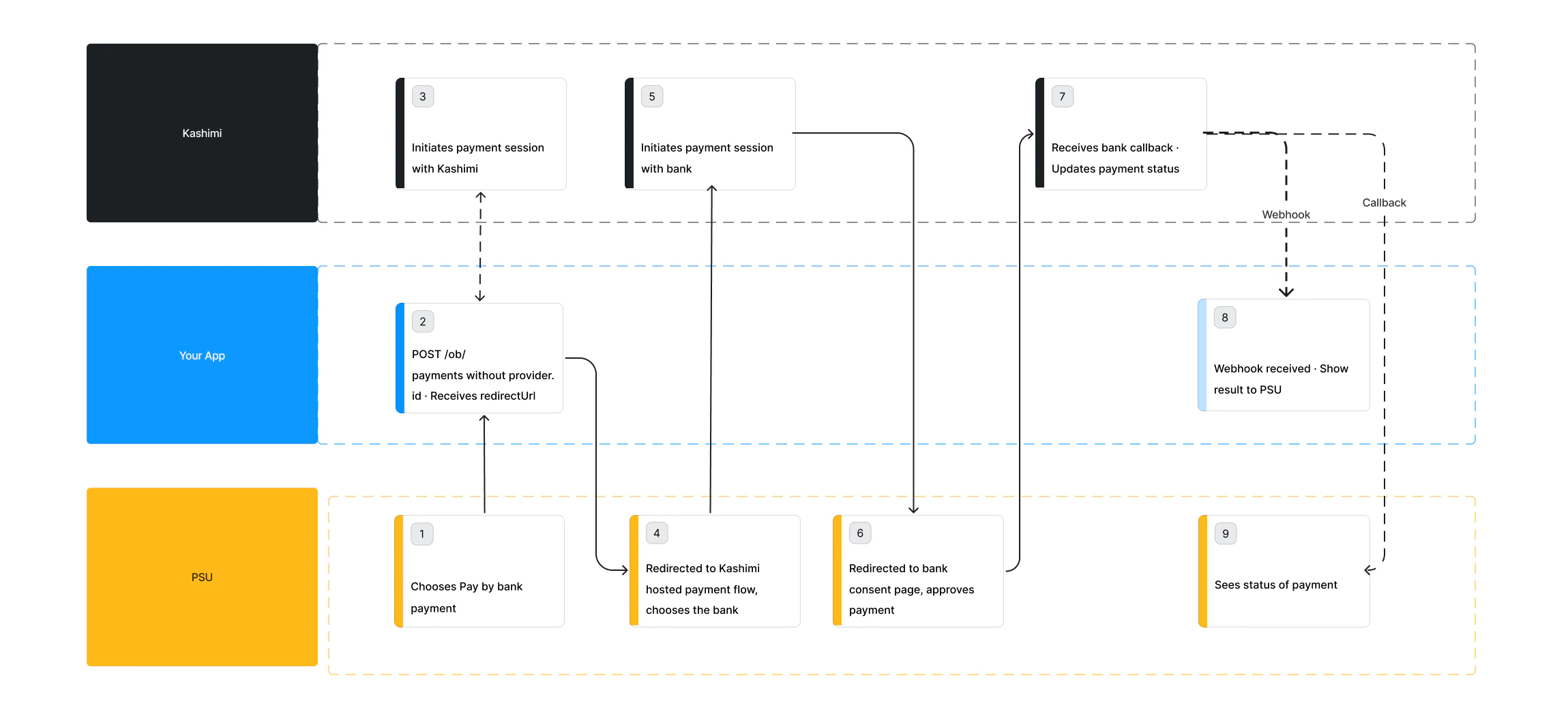
In the hosted bank selection flow, your application initiates a payment without specifying a provider ID. Kashimi responds with a URL to its own hosted bank selection screen. The PSU selects their bank there, then proceeds through the full authorisation flow — all without your application needing to fetch or render a bank list.
 ## How it works
Call [POST /ob/payments](/api-reference/endpoint/initiatePayments) with the payment details but **without** a `provider.Id`. Kashimi returns a `redirectUrl` pointing to the hosted bank selection screen.
Use `provider.preferences.countryCodes.list` to control which countries are shown on Kashimi's hosted bank selection screen. Only banks from the specified countries will be displayed to the PSU. If omitted, all available banks are shown. Use `provider.preferences.countryCodes.default` to set which country is selected by default when the PSU lands on the screen.
```json Request theme={null}
{
"provider": {
"preferences": {
"countryCodes": {
"list": ["NL"],
"default": "LT"
}
}
},
"paymentScheme": {
"name": "SEPA",
"preferences": { "mode": "INSTANT" }
},
"sender": {
"account": {
"number": {
"type": "IBAN",
"value": "DE89370400440532013000"
},
"currency": "EUR"
},
"address": {
"country": "NL",
"city": "Amsterdam",
"streetName": "Damstraat",
"buildingNumber": "1A",
"postCode": "1012AB"
},
},
"recipient": {
"account": {
"number": {
"type": "IBAN",
"value": "DE89370400440532013000"
}
},
"name": "John Doe",
"address": {
"country": "NL",
"city": "Amsterdam",
"streetName": "Damstraat",
"buildingNumber": "1A",
"postCode": "1012AB"
}
},
"amount": 10,
"currency": "EUR",
"remittanceInformation": {
"type": "UNSTRUCTURED",
"value": "Invoice1234567890"
},
"metadata": {
"redirectUri": "https://yourapp.com/payment/callback",
"psuIpAddress": "84.240.80.120",
"psuUserAgent": "Mozilla/5.0 (Windows NT 10.0; Win64; x64) AppleWebKit/537.36",
"endToEndId": "123456789123456789",
"webhookUrl": "https://yourapp.com/webhooks/kashimi"
}
}
```
```json Response theme={null}
{
"paymentId": "56caec01-85cc-4fc6-8080-cc0f7ed03a7e",
"redirectUrl": "https://pay.kashimi.tech/select?paymentId=xyz",
"status": "PENDING"
}
```
Send the PSU to the `redirectUrl`. They will land on Kashimi's hosted bank selection UI — no bank list fetching or UI rendering required on your side.
The PSU browses and selects their bank on Kashimi's hosted screen. Kashimi then redirects the PSU to the selected bank's authentication page.
The PSU authenticates and approves the payment on their bank's website. This happens entirely on the bank's side.
After approval or rejection, the bank redirects the PSU back to Kashimi and back to your `callbackUrl`. Do not assume success at this point — always verify the actual status.
Poll [GET /payment-statuses/latest](/api-reference/endpoint/latestPaymentStatus) or receive a webhook. Show a success screen only once `status` is `COMPLETED`.
***
## Full payment flow
The complete experience varies by bank. Most banks use a redirect flow; some use an embedded flow where credentials are collected in your UI.
## How it works
Call [POST /ob/payments](/api-reference/endpoint/initiatePayments) with the payment details but **without** a `provider.Id`. Kashimi returns a `redirectUrl` pointing to the hosted bank selection screen.
Use `provider.preferences.countryCodes.list` to control which countries are shown on Kashimi's hosted bank selection screen. Only banks from the specified countries will be displayed to the PSU. If omitted, all available banks are shown. Use `provider.preferences.countryCodes.default` to set which country is selected by default when the PSU lands on the screen.
```json Request theme={null}
{
"provider": {
"preferences": {
"countryCodes": {
"list": ["NL"],
"default": "LT"
}
}
},
"paymentScheme": {
"name": "SEPA",
"preferences": { "mode": "INSTANT" }
},
"sender": {
"account": {
"number": {
"type": "IBAN",
"value": "DE89370400440532013000"
},
"currency": "EUR"
},
"address": {
"country": "NL",
"city": "Amsterdam",
"streetName": "Damstraat",
"buildingNumber": "1A",
"postCode": "1012AB"
},
},
"recipient": {
"account": {
"number": {
"type": "IBAN",
"value": "DE89370400440532013000"
}
},
"name": "John Doe",
"address": {
"country": "NL",
"city": "Amsterdam",
"streetName": "Damstraat",
"buildingNumber": "1A",
"postCode": "1012AB"
}
},
"amount": 10,
"currency": "EUR",
"remittanceInformation": {
"type": "UNSTRUCTURED",
"value": "Invoice1234567890"
},
"metadata": {
"redirectUri": "https://yourapp.com/payment/callback",
"psuIpAddress": "84.240.80.120",
"psuUserAgent": "Mozilla/5.0 (Windows NT 10.0; Win64; x64) AppleWebKit/537.36",
"endToEndId": "123456789123456789",
"webhookUrl": "https://yourapp.com/webhooks/kashimi"
}
}
```
```json Response theme={null}
{
"paymentId": "56caec01-85cc-4fc6-8080-cc0f7ed03a7e",
"redirectUrl": "https://pay.kashimi.tech/select?paymentId=xyz",
"status": "PENDING"
}
```
Send the PSU to the `redirectUrl`. They will land on Kashimi's hosted bank selection UI — no bank list fetching or UI rendering required on your side.
The PSU browses and selects their bank on Kashimi's hosted screen. Kashimi then redirects the PSU to the selected bank's authentication page.
The PSU authenticates and approves the payment on their bank's website. This happens entirely on the bank's side.
After approval or rejection, the bank redirects the PSU back to Kashimi and back to your `callbackUrl`. Do not assume success at this point — always verify the actual status.
Poll [GET /payment-statuses/latest](/api-reference/endpoint/latestPaymentStatus) or receive a webhook. Show a success screen only once `status` is `COMPLETED`.
***
## Full payment flow
The complete experience varies by bank. Most banks use a redirect flow; some use an embedded flow where credentials are collected in your UI.
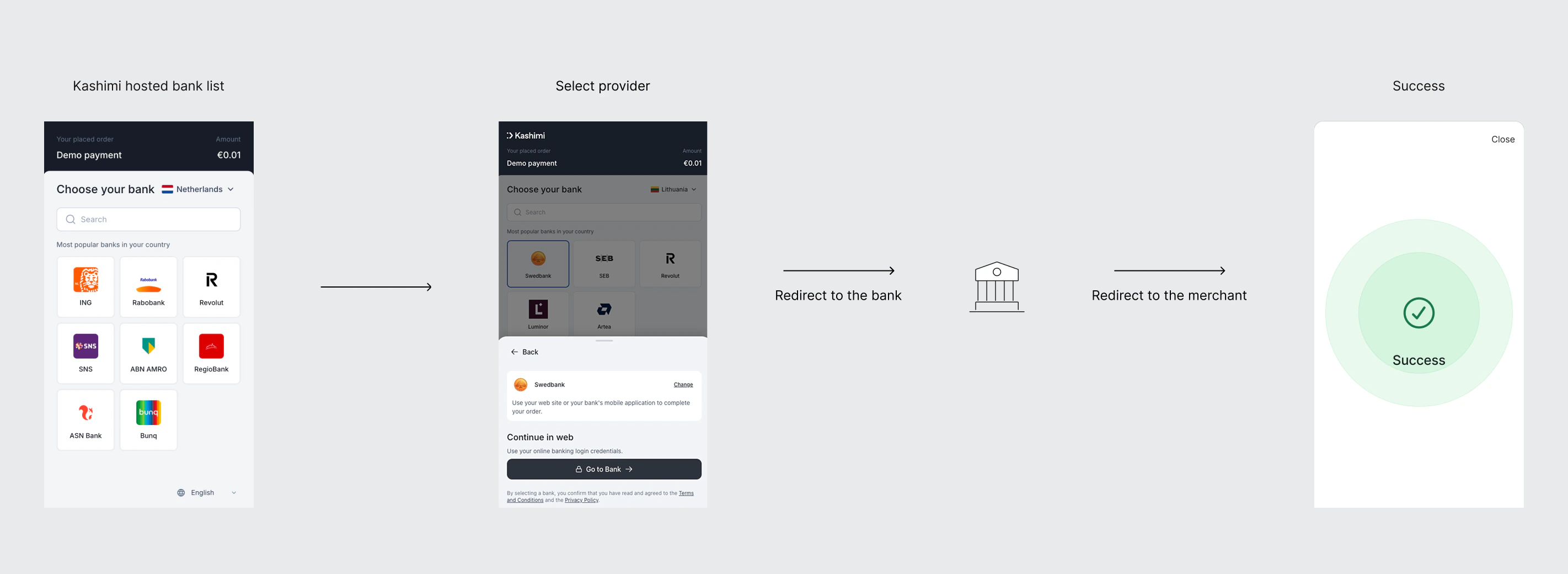 The PSU selects their bank on Kashimi's hosted screen, is redirected to the bank's website or app to authenticate and approve the payment, then returns to your `redirectUri`. You confirm the final status via webhook or status poll.
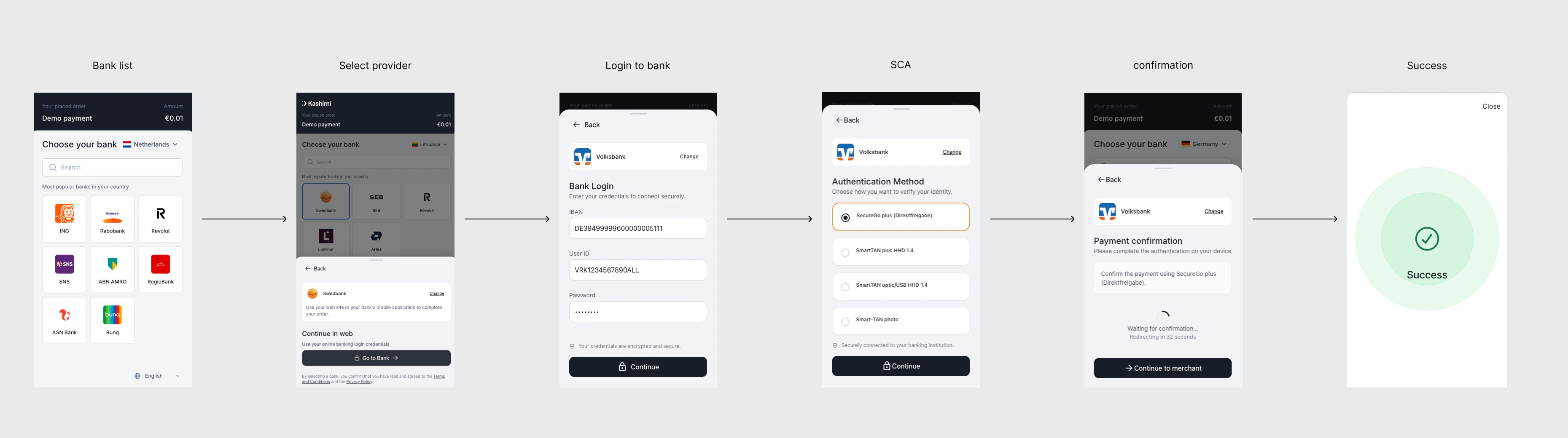 For banks where `SENDER_PROVIDER_CREDENTIALS_PASSWORD` is present in `requiredPaymentFields`, Kashimi's hosted screen collects the PSU's credentials directly and submits them to the bank. There is no redirect to the bank's website — Kashimi handles the full embedded flow on its own UI.
Never log, store, or cache credentials. Use HTTPS only. Clear credential values from memory immediately after the request is sent.
For banks where `SENDER_PROVIDER_CREDENTIALS_PASSWORD` is present in `requiredPaymentFields`, Kashimi's hosted screen collects the PSU's credentials directly and submits them to the bank. There is no redirect to the bank's website — Kashimi handles the full embedded flow on its own UI.
Never log, store, or cache credentials. Use HTTPS only. Clear credential values from memory immediately after the request is sent.