> ## Documentation Index
> Fetch the complete documentation index at: https://docs.kashimi.tech/llms.txt
> Use this file to discover all available pages before exploring further.
# Hosted UI Screens
> A reference for every screen the PSU sees during the Kashimi hosted payment flow, and what can be customised.
When you use the [Hosted Bank Selection](/guides/hosted-flow) flow, Kashimi presents its own screens to the PSU before handing off to the bank. This page documents each screen, when it appears, and what can be customised.
***
## Screens
### Bank list
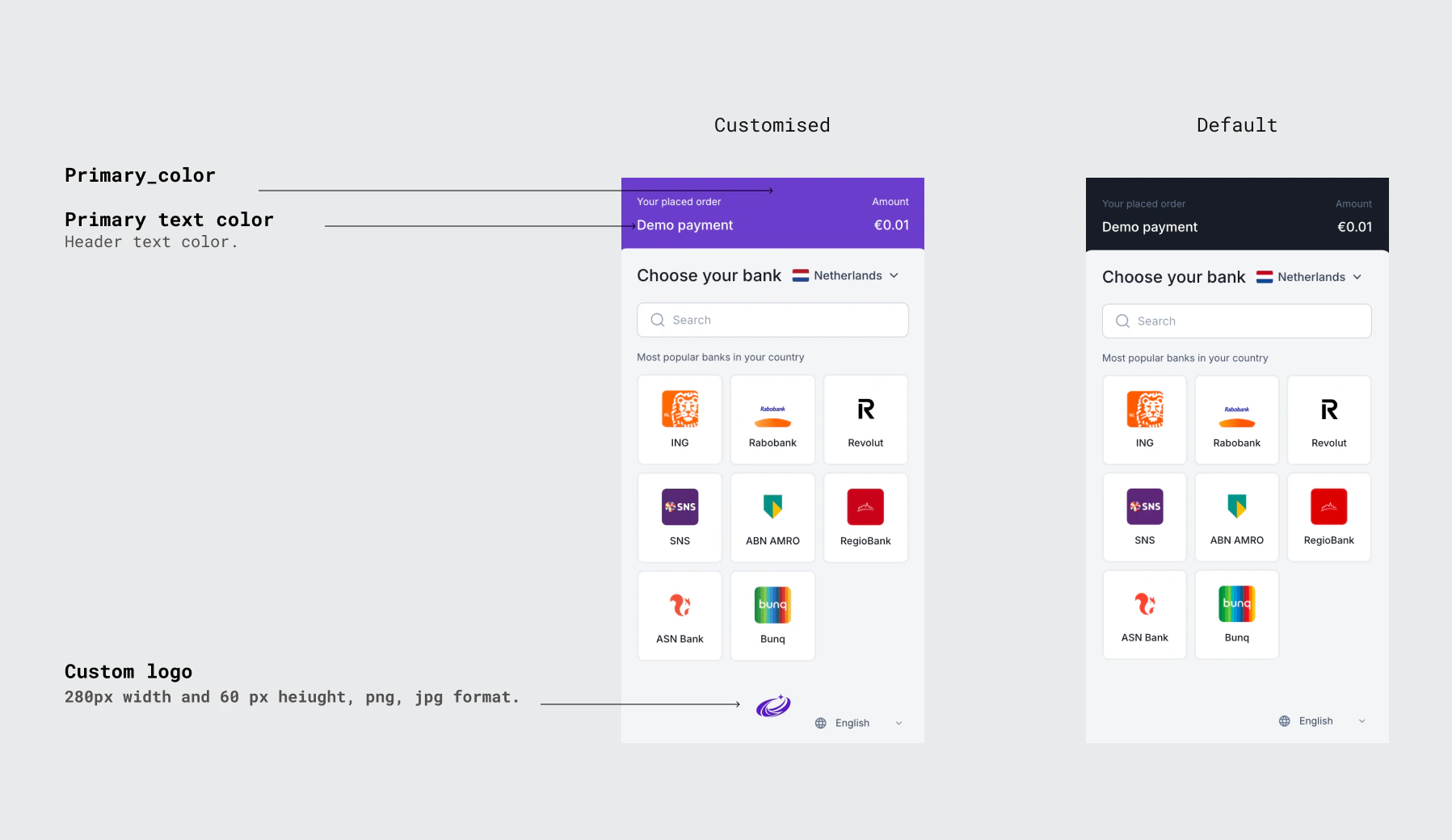
The PSU lands here after being redirected to the `redirectUrl` returned by `POST /ob/payments`. They see a list of available banks filtered by the `countryCodes` you passed in the request. A country selector and search field are shown to help the PSU find their bank quickly.
 ***
### Provider confirmation
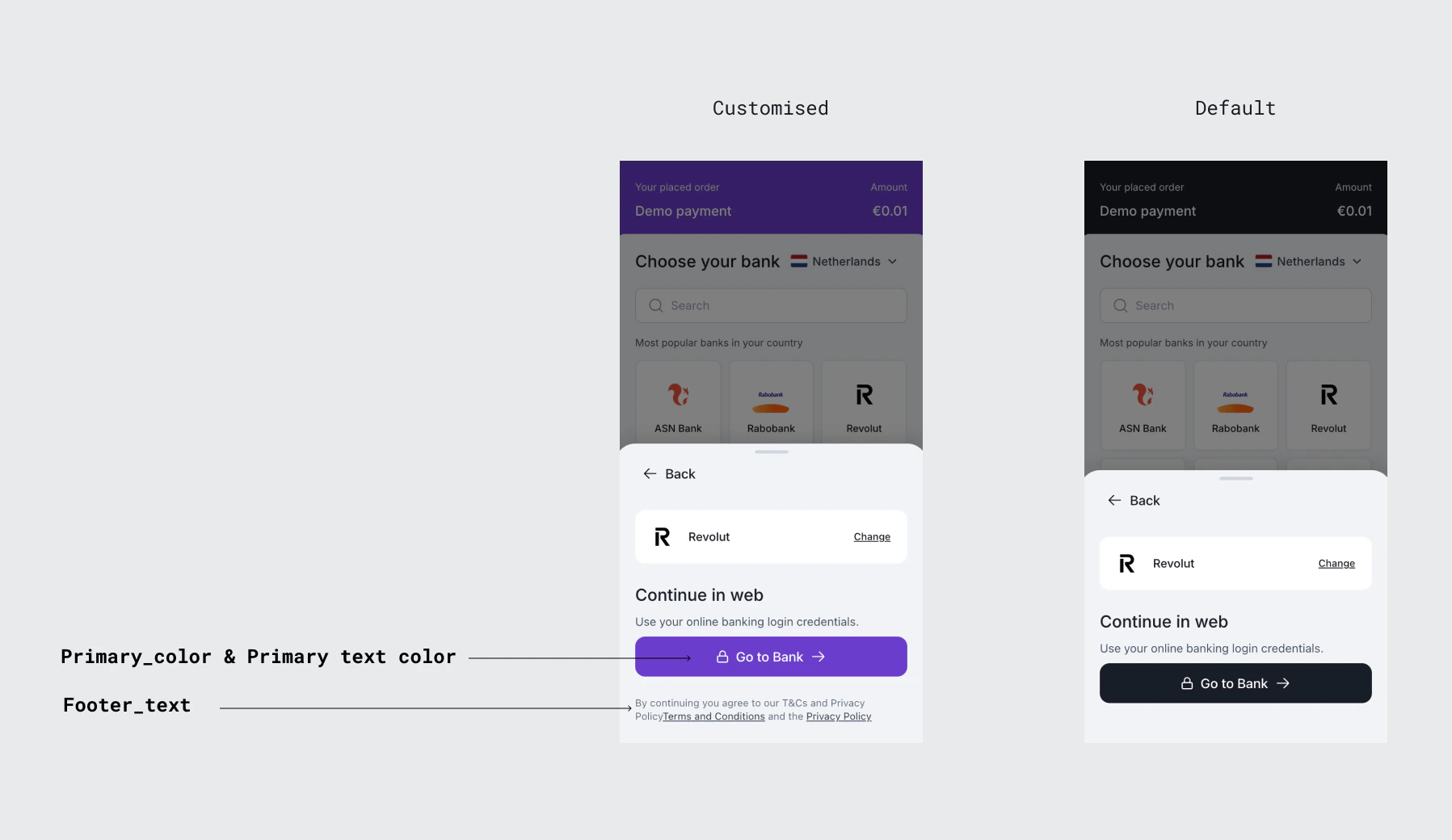
After the PSU selects a bank, this screen confirms their choice and shows the payment details. The PSU can review the amount and recipient before proceeding. A **Go to Bank** button redirects them to the bank's authentication page.
This screen appears for the **redirect flow** only. Banks that use the embedded flow proceed directly to credential collection without this screen.
***
### Provider confirmation
After the PSU selects a bank, this screen confirms their choice and shows the payment details. The PSU can review the amount and recipient before proceeding. A **Go to Bank** button redirects them to the bank's authentication page.
This screen appears for the **redirect flow** only. Banks that use the embedded flow proceed directly to credential collection without this screen.
 ***
## Customisation
The hosted screens can be customised to match your brand. Customisation is configured per client and applied by the Kashimi team. Contact [admin@kashimi.tech](mailto:admin@kashimi.tech) to set up or update your configuration.
| Field | Description |
| --------------------- | ------------------------------------------------------------------------------------------------------ |
| `primary_color` | Hex colour code applied to buttons and interactive elements across all hosted screens (e.g. `#000000`) |
| `logo_url` | URL of your company logo displayed at the top of each hosted screen |
| `favicon_url` | URL of the favicon shown in the browser tab during the hosted flow |
| `terms_url` | URL to your Terms and Conditions page — linked in the hosted UI footer |
| `privacy_policy_url` | URL to your Privacy Policy page — linked in the hosted UI footer |
| `footer_text` | Custom text displayed in the footer of the hosted screens. Supports multiple paragraphs. |
| `psu_portal_base_url` | Base URL for the PSU portal. If `null`, the default Kashimi-hosted portal is used. |
***
## Customisation
The hosted screens can be customised to match your brand. Customisation is configured per client and applied by the Kashimi team. Contact [admin@kashimi.tech](mailto:admin@kashimi.tech) to set up or update your configuration.
| Field | Description |
| --------------------- | ------------------------------------------------------------------------------------------------------ |
| `primary_color` | Hex colour code applied to buttons and interactive elements across all hosted screens (e.g. `#000000`) |
| `logo_url` | URL of your company logo displayed at the top of each hosted screen |
| `favicon_url` | URL of the favicon shown in the browser tab during the hosted flow |
| `terms_url` | URL to your Terms and Conditions page — linked in the hosted UI footer |
| `privacy_policy_url` | URL to your Privacy Policy page — linked in the hosted UI footer |
| `footer_text` | Custom text displayed in the footer of the hosted screens. Supports multiple paragraphs. |
| `psu_portal_base_url` | Base URL for the PSU portal. If `null`, the default Kashimi-hosted portal is used. |