> ## Documentation Index
> Fetch the complete documentation index at: https://docs.kashimi.tech/llms.txt
> Use this file to discover all available pages before exploring further.

# Integration Flows

> Choose how your customers select their bank at payment time.

Kashimi supports two integration approaches. The difference comes down to one question: **who shows the bank selection screen to the PSU?**

<CardGroup cols={2}>
  <Card title="Custom Bank Selection" icon="list" href="/guides/provider-selection-flow">
    <img src="https://mintcdn.com/kashimi-8bd54f89/yNXHh_NHrE9cbmSM/images/guides/custom-bank-selection-flow.png?fit=max&auto=format&n=yNXHh_NHrE9cbmSM&q=85&s=0a43f1483e4e07cf5127067404e1978d" alt="Custom Bank Selection" style={{ borderRadius: '8px', marginBottom: '16px', marginTop: '12px' }} width="2299" height="1041" data-path="images/guides/custom-bank-selection-flow.png" />

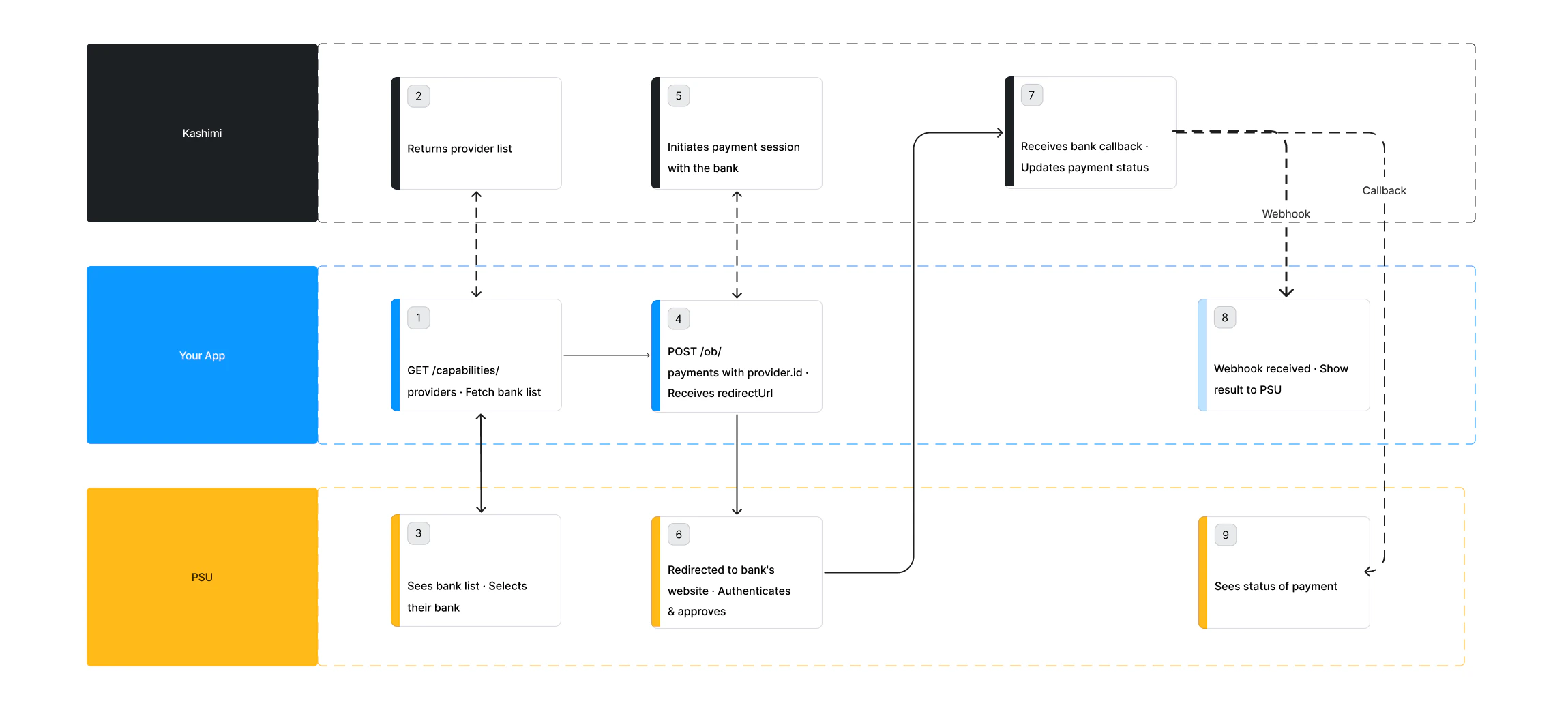
    You fetch the list of banks and render your own bank picker inside your UI. The PSU selects a bank without ever leaving your application. You pass the selected `provider.id` when initiating the payment.

    **Best for:** teams that want full control over the checkout experience and brand consistency.
  </Card>

  <Card title="Hosted Bank Selection" icon="arrow-up-right-from-square" href="/guides/hosted-flow">
    <img src="https://mintcdn.com/kashimi-8bd54f89/yNXHh_NHrE9cbmSM/images/guides/hosted-bank-selection-flow.png?fit=max&auto=format&n=yNXHh_NHrE9cbmSM&q=85&s=4f6873a6d7c5bfd1d443d38faf3d8e6d" alt="Hosted Bank Selection" style={{ borderRadius: '8px', marginBottom: '16px', marginTop: '12px' }} width="2299" height="1041" data-path="images/guides/hosted-bank-selection-flow.png" />

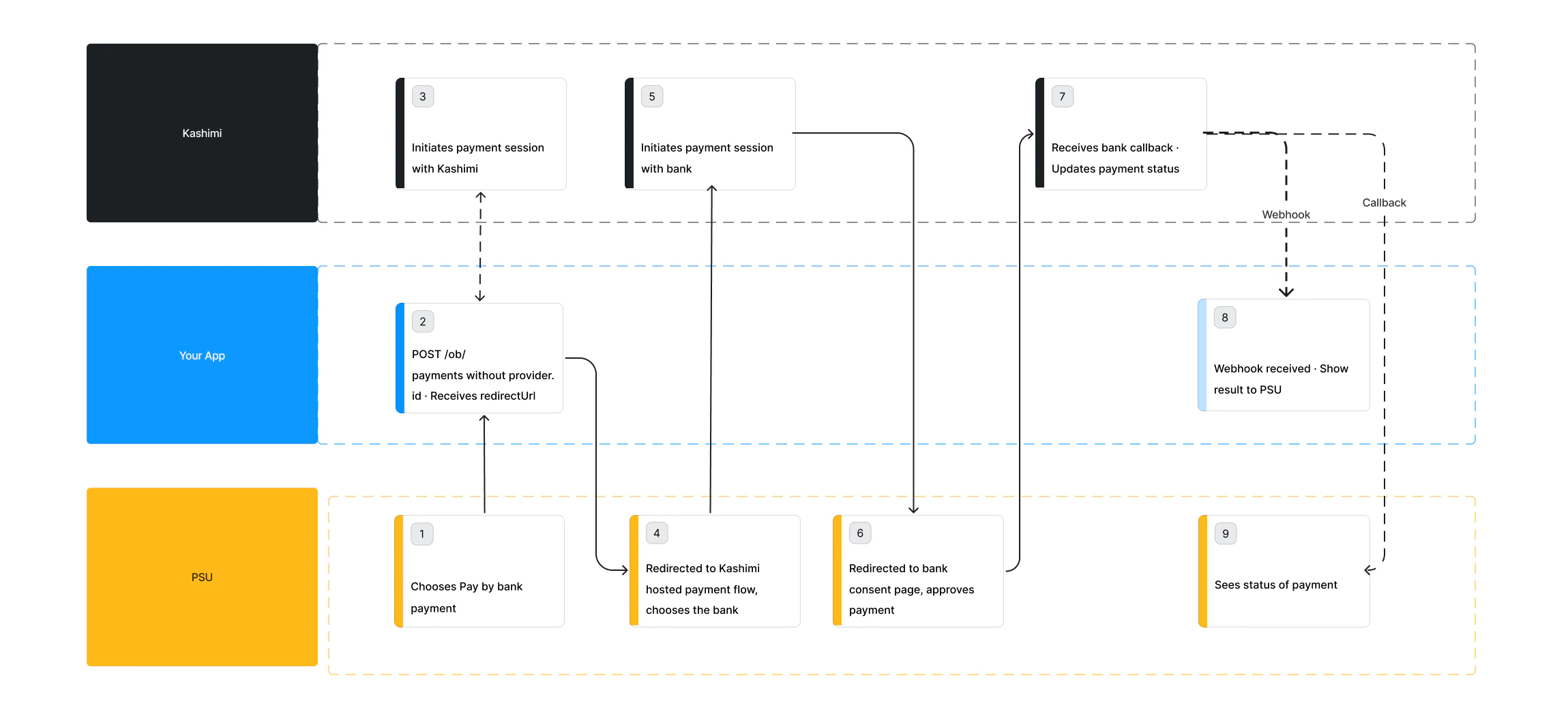
    You skip the bank list entirely. Kashimi redirects the PSU to its own hosted bank selection screen, where they pick their bank and authorise the payment. No `provider.id` required.

    **Best for:** teams that want the fastest integration with minimal frontend work.
  </Card>
</CardGroup>

***

## Comparison

|                        | Custom Bank Selection    | Hosted Bank Selection         |
| ---------------------- | ------------------------ | ----------------------------- |
| Bank selection UI      | Built by you             | Kashimi hosted screen         |
| Time to integrate      | Longer                   | Faster                        |
| Brand & design control | Full control             | Limited                       |
| Bank list maintenance  | You manage               | Automatic                     |
| `provider.id` required | Yes                      | No                            |
| PSU leaves your app    | No (until bank redirect) | Yes (to Kashimi screen first) |

***

## Which should I choose?

<div style={{display:'grid', gridTemplateColumns:'1fr 1fr', gap:'48px', marginTop:'8px'}}>
  <div>
    <p style={{fontSize:'12px', fontWeight:'600', color:'#6b7280', textTransform:'uppercase', letterSpacing:'0.06em', marginBottom:'20px'}}>Custom Bank Selection</p>

    <div style={{display:'flex', flexDirection:'column', gap:'12px'}}>
      <div style={{display:'flex', gap:'10px'}}><span style={{color:'#16a34a', fontWeight:'700', flexShrink:0}}>✓</span><span>Full brand and design control</span></div>
      <div style={{display:'flex', gap:'10px'}}><span style={{color:'#16a34a', fontWeight:'700', flexShrink:0}}>✓</span><span>Seamless experience — PSU never leaves your app before bank redirect</span></div>
      <div style={{display:'flex', gap:'10px'}}><span style={{color:'#16a34a', fontWeight:'700', flexShrink:0}}>✓</span><span>Custom bank filtering, ranking and search</span></div>
      <div style={{display:'flex', gap:'10px'}}><span style={{color:'#16a34a', fontWeight:'700', flexShrink:0}}>✓</span><span>Works well in native mobile apps</span></div>
    </div>
  </div>

  <div>
    <p style={{fontSize:'12px', fontWeight:'600', color:'#6b7280', textTransform:'uppercase', letterSpacing:'0.06em', marginBottom:'20px'}}>Hosted Bank Selection</p>

    <div style={{display:'flex', flexDirection:'column', gap:'12px'}}>
      <div style={{display:'flex', gap:'10px'}}><span style={{color:'#16a34a', fontWeight:'700', flexShrink:0}}>✓</span><span>Pre-built bank selection UI — no frontend work</span></div>
      <div style={{display:'flex', gap:'10px'}}><span style={{color:'#16a34a', fontWeight:'700', flexShrink:0}}>✓</span><span>Quick to implement — 1 API call</span></div>
      <div style={{display:'flex', gap:'10px'}}><span style={{color:'#16a34a', fontWeight:'700', flexShrink:0}}>✓</span><span>Kashimi keeps the bank list updated automatically</span></div>
      <div style={{display:'flex', gap:'10px'}}><span style={{color:'#16a34a', fontWeight:'700', flexShrink:0}}>✓</span><span>Real-time webhook notifications for payment status</span></div>
    </div>
  </div>
</div>

<Info>
  Both flows go through the same redirect step to the bank's website for PSU authentication and payment approval. The only difference is **who renders the bank picker** before that redirect happens.
</Info>
